
TeleType
Share your terminal online, optionally allow participants to collaborate on your shell.
What you can do
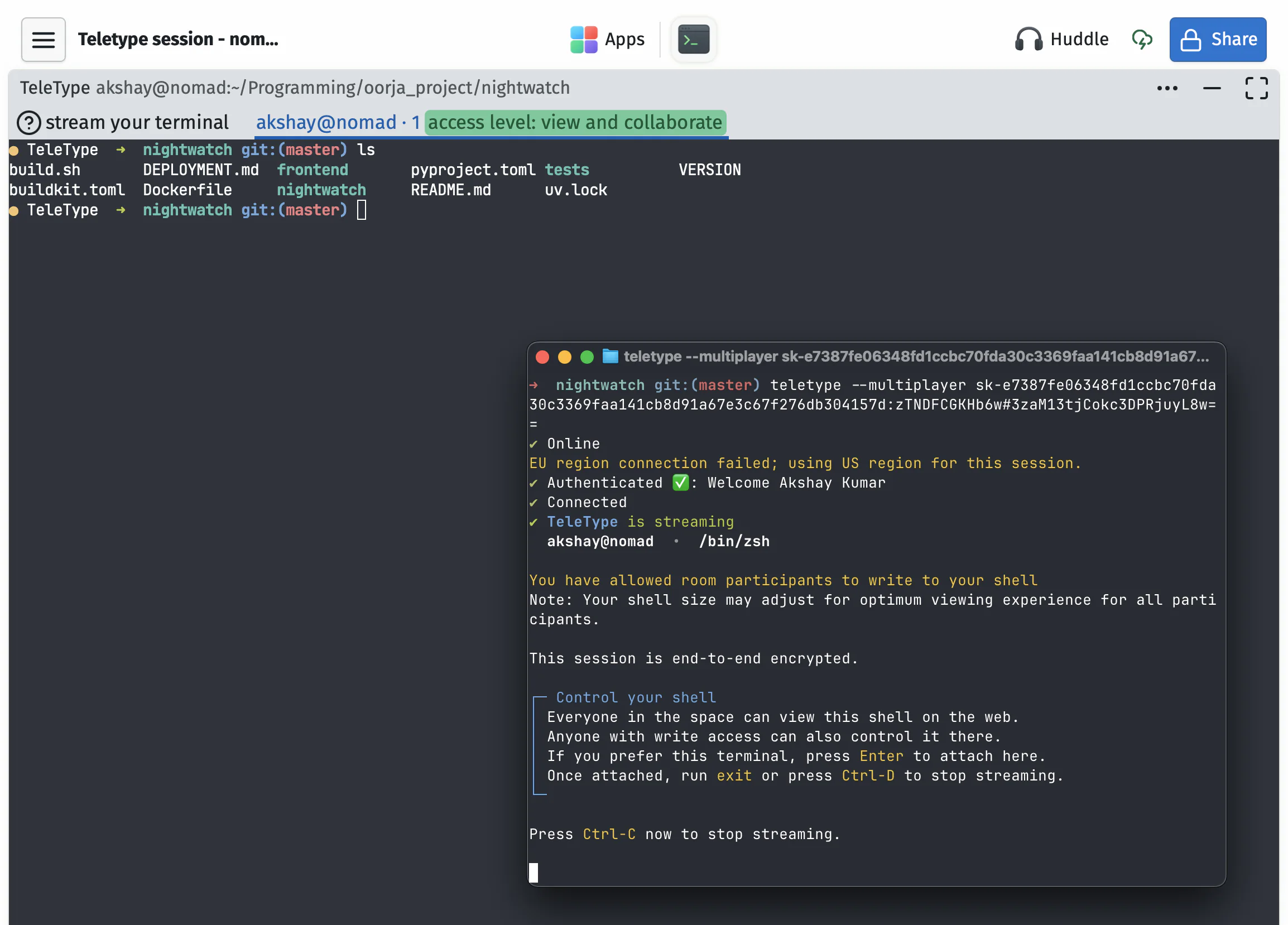
Stream your terminal
Connect your local shell to a space. View-only by default, or enable multiplayer so others can type.
Multiple hosts, multiple shells
Several people can stream their terminals at once. Use --multishell to host multiple tabs from one machine.
Drop files in
Drop files onto the terminal to copy them to the current directory. Limited to 100 MB, host only.
Questions
How do I install it?
Install via npm: npm install -g oorja. Then use oorja teletype with a stream key from your space. Stream keys are personal, don't share them. TeleType is open source. check the repo for full docs and to file issues. Windows is not well-tested. It may work, but it's not something we test thoroughly.
Does it work without Node.js?
No. The CLI requires Node.js. It doesn't run on Bun. node-pty, the terminal library we use, isn't supported on the Bun runtime.
Does TeleType run a new terminal in the cloud?
No. It streams your real terminal from your machine. CloudShell is the app for an on-demand cloud-based shell.
Can other people type in my terminal?
Only if you turn on multiplayer mode. It's view-only by default. Use --multiplayer and only with people you trust.
Can multiple people host at the same time?
Yes. Several participants can stream their own terminals into the same space. Each host appears as its own tab.
Can I run multiple shells?
Yes. Use --multishell to host multiple terminal tabs from one machine, controlled from the web app.
Can I drop files into it?
Yes. Drop files onto the terminal to copy them to the current directory. Limited to 100 MB, and only the host can do it.
Can I use it to debug CI pipelines?
Yes. Use --ci-debug to stream your CI shell into a space and poke around. Check what commands work, see how directories are set up, and fix issues interactively instead of experimenting PR by PR.
Can I use it on a machine where I'm not signed in?
Yes. Use a stream key from your space to connect without logging in. Handy for non-personal or CI machines.
Does closing the browser stop my local command?
No. The command is running in your local terminal, not the browser. End the shared stream when you're done.
How do I share my space?
In your open space, click the blue share button at the top right. From there, select an access level (editor or view-only), then copy the invite link or show a QR code. You can regenerate the link anytime to invalidate previous ones.
Share with colleagues, students, or friends. They don't need to be in your organization.
Do my collaborators need an account?
No. Share the invite link from your space and they can join right from their browser as a guest, or by signing in with Google or Email. They don't need a paid plan to collaborate with you.
Is my data private?
SupaKit is designed to be privacy focused. Content in your spaces is end-to-end encrypted between participants. We recommend setting your own keychain password in Settings after creating your account. Read our security page for more details.
Can I use it solo, without collaborators?
Absolutely. We use it that way ourselves, mostly for our own notes, travel-plans, projects, and whatever we're building. Collaboration is there when you need it or want to share it.
Do I need to install anything?
No. SupaKit runs in your browser. It opens with a link, no downloads or installs, for you or anyone you share a space with. You can pin it to your dock or home screen for quicker access and a dedicated window. It stays safely sandboxed in your browser.
Can I control space access for collaborators?
Yes. You can control this from the share button at the top right of your space, where you'll see all collaborators and their access levels. Each person can either have full write and edit access, or view-only, meaning they can see everything but can't make changes.
How many collaborators can I have?
For apps that involve streaming (e.g. Huddles, Screenshare, CloudBrowser) active participants are capped at about 5 per space on Standard, and up to 10 on Pro. For everything else, you can have quite a few more collaborators in a space without hitting limits.
We're still experimenting with these knobs. SupaKit is designed for active collaboration among smaller groups, not webinars or large calls. It may be able to handle a large number of participants, but the experience is tuned for smaller groups, whether that's a team, a classroom, a workshop, or a few people working together.
Limits are based on sustained usage, not occasional bursts. If you go over briefly, it won't be an issue.